
Turning Conversations into Capital
Automate Sales via Strategic Message Triggers
In 5Ws, message automation is defined by the principle that a message is not just a conversation, but a strategic trigger and a data-driven "Event". By treating incoming and outgoing communication as catalysts, the system can initiate new processes or dynamically update existing ones in real-time. This functionality is governed by a spreadsheet-based "logic brain" that processes chat data as measurable input to determine the next steps for the organization.
Here are some examples:
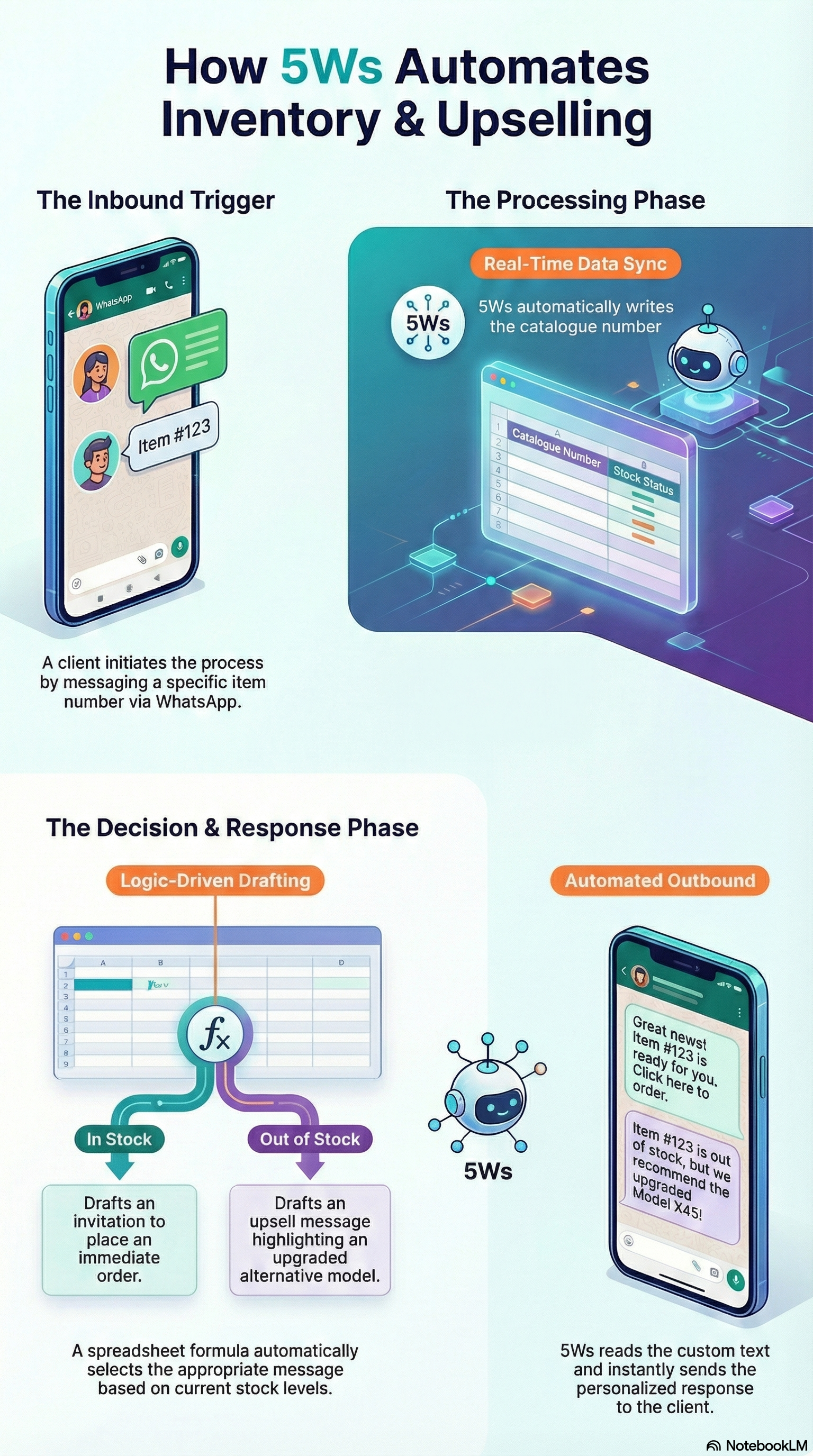
Intelligent Inventory & Alternative Upselling:
In this scenario, 5Ws acts as an automated sales assistant that manages stock queries and provides alternatives.
The Inbound Trigger: A client sends a WhatsApp message: "Do you have item #AZ-500 in stock?".
Real-Time Data Processing: 5Ws finds the item in its internal database. Then it immediately "Writes" this catalogue number, stock status and alternative items into your spreadsheet engine.
The Logic Decision: Your spreadsheet formula makes the decision:
If in stock: The formula drafts a message: "Hi [Client Name], item #AZ-500 is available! Would you like to place an order now?
If out of stock: The logic brain drafts: "Hi [Client Name], item #AZ-500 is currently out of stock. However, we have the upgraded #AZ-550 available. Would you like to see the details?".
• The Automated Outbound: 5Ws "Reads" this custom text and instantly fires the personalized message back to the client.
Automated Service Quote & Payment Link
This example demonstrates how message data can trigger a "Frictionless Transaction".
The Inbound Trigger: A customer sends a message with a service code: "Quote for Service-B at Postcode SW1A."
The Logic Decision: 5Ws finds the service code in its database and write all information into the spreadsheet. The spreadsheet calculates the price based on the service type and the distance/location. It drafts a personalized message- "Your quote for Service-B is £150. You can confirm and pay securely here: [Payment URL]."
The Automated Outbound: 5Ws reads the data from the spreadsheet and fires the customized reply.
Next Steps: Once the client pays on their mobile, 5Ws marks the task as "done" and automatically triggers the next phase, such as scheduling a technician in the team's task list or calendar.
Dynamic order status checking
This uses automation to keep a "Living, Breathing Process" that reflects current reality.
The Inbound Trigger: A client sends a sales order number to check on a pending order: "Status of #ORD-99?"
The Logic Decision: 5Ws finds a sales order that its number equal to the number in the message. Order details then sent to the spreadsheet that calculates in its turn the estimated delivery time and drafts a reply message- "Your #ORD-99 is delayed by 3 days. Your new delivery date is …".
The Automated Outbound: 5Ws reads the data from the spreadsheet and fires the reply message to the client.
Your process management requires a sophisticated digital orchestra. Read more about our digital instruments—5Ws built-in features:
-
Unlock the Power of Your Logic: The Spreadsheet as Your Engine (read more)
-
Dynamic Event Orchestration: The Engine of Your Process (read more)
-
Seamless Calendar Sync: Work Where You Are (read more)
-
Integrated Cloud Document Management (read more)
-
-
-
-
Ready to automate messages and turn them into capital?
Tell us what you need—we will help you implement your ideas into 5Ws and book a relevant demo for you.